

One of the downsides of a Polestar 2 is that it does not provide much in the way of statistics or data regarding your drives. The Range Assistant app does give you dynamic efficiency data, but its historical data is limited and not reliable.
The Polestar phone app also only shows the Trip Auto and Trip Manual stats, which are also very basic and seemingly inaccurate. For example, it is showing my Average Consumption as “10.8 kWh / 100mi”. That would be an utterly amazing 9.25 mi/kWh, which is obviously completely ridiculous.
Such an amazing efficiency would result in a range of nearly 700 miles!
Journey Log
There is another app you can install on the Polestar itself called the Journey Log (it may already be installed). It tracks all your drives and does display some information about them, but it doesn’t offer any way to provide a summarization of that data. You can only look at one drive at a time.

If you’ve never used Journey Log before, you do need to open it at least once and give it permissions to allow it to track drive data.
Journey Log shows a list of all your drives/trips. You can filter it in certain ways and tap on a drive to see more details about it, including a map, consumption and even add your own notes and a category.
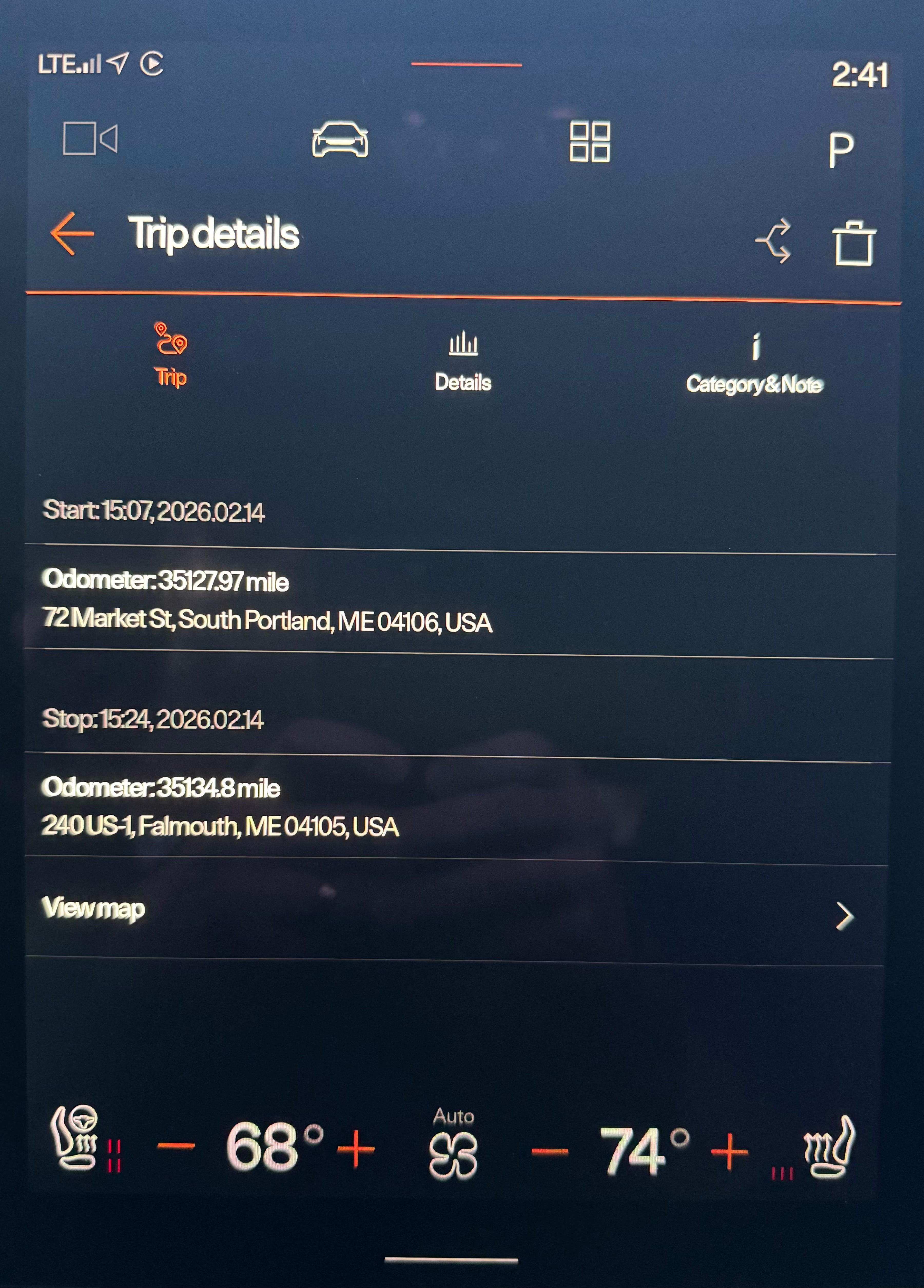
It’s an interesting app, but it is slow and not all that useful by itself1. I’m not likely to add notes about my trips from within the car. And it does not show any nice graphs or summary of the trip data.
Fortunately, you can ask Journey Log to send you an email with all the data. Just click the Export button at the top. After you do this, you’ll get an email with a CSV (comma separated file) and an XLSX (Excel file). These files have a row for each drive and many columns with lots of data.
I’ve been meaning to create a quick app to read and parse that exported data to show some summary stats and graphs, but I never got around to it.
Journey Log Explorer
It turns out that now I don’t need to!2 I recently came across an open-source project that does just this3: Polestar Journey Log Explorer. It’s a web app where you can supply your exported data file and it outputs a graph of data.
The open-source project is on GitHub.
And here is an online version of Polestar Journey Log Explorer you can directly use: https://polestar-oss.github.io/polestar-journey-log-explorer/
Unfortunately when I first tried it with an exported CSV file, it was just reporting an error. It turns out that, as written, the tool attempts to verify the file and in doing so looks for a column called “Distance in KM”. However, I am in the US, so the equivalent column for me is output as “Distance in Mile”.
To work around this problem, I opened the CSV file in a text editor and changed the column name from “Distance in KM” to “Distance in Mile” and saved it.
The CSV was then loaded properly by the app and I got some stats back. Of course it is still showing “km” for distances when everything is really miles, but otherwise it seems fine.
Update Feb 20, 2026: The author has updated to project so that it now works correctly with miles or kilometers.
Here is the output:
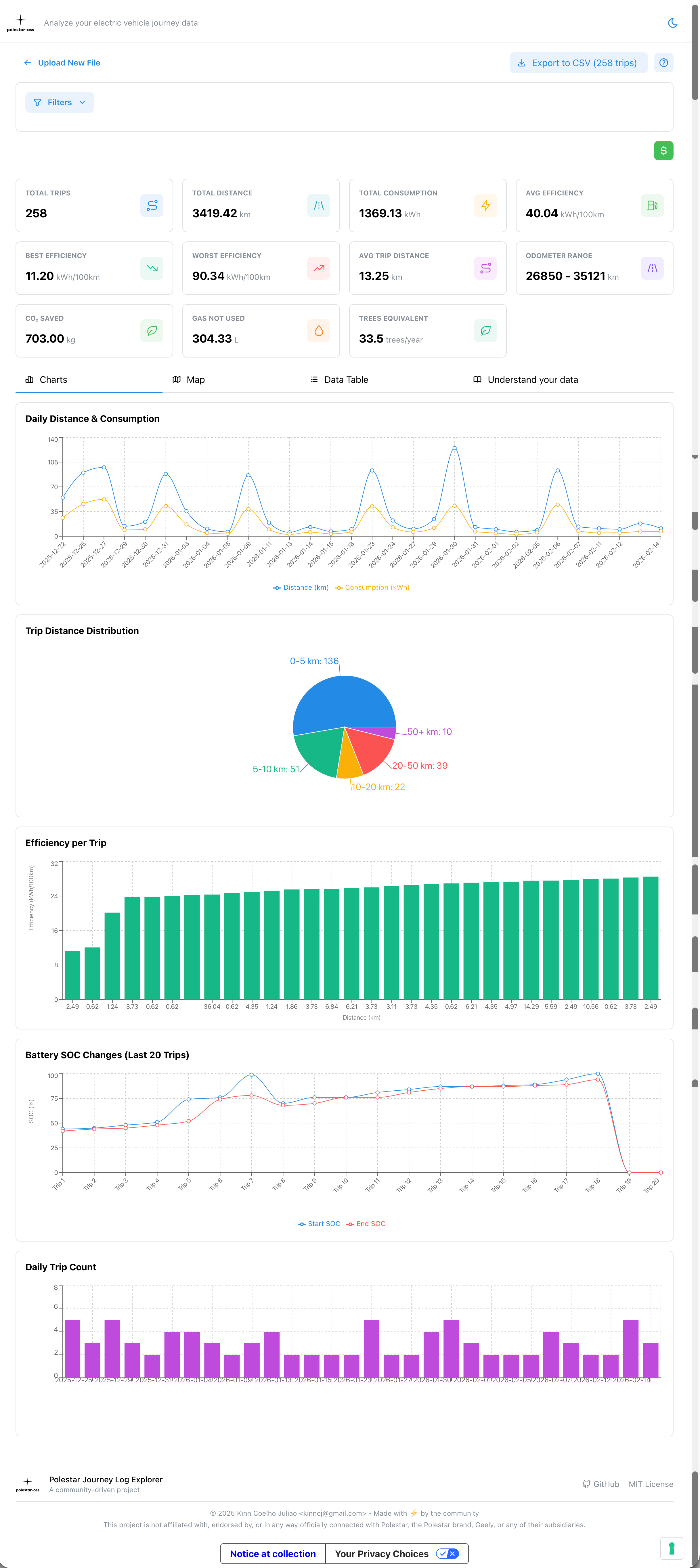
Unfortunately for me, I have a big gap in the data. I had enabled Journey Log when I first got my Polestar 2 last year, but in June I did a Factory Reset to fix the app/PAK problems I had been having and did not start Journey Log again (to give it permission to track drives) until December. So I’m missing about 6 months worth of driving data.
Other Posts You Might Like
Polestar 2 Tips and Tricks

Here are some, perhaps unknown to you, tips and tricks you might find helpful about the Polestar 2.
My Favorite Things About the Polestar 2

After driving my 2021 Polestar 2 for about five months now, here are some of my favorite things about it.Subscribe for free to Current Notes to get more great Polestar 2 content!
It often reports an error when loading data, but tapping “Try Again” seems to work. It can take several seconds for all the data to load.
Although I still might if I can find the time.
I saw this on either Reddit or Facebook in late 2025, but cannot find the source link any more.